
Tag your DMB and Phish live recordings from the setlist
Review first. Write when you're sure.
TagBot matches your audio files to the setlist and shows you every result before writing a single tag. Uncertain matches are flagged for review.
v0.3.0-alpha.44 · Windows · friend-test release
Local-first
Runs entirely on your machine. No cloud, no account, and your audio and files never leave your drive. Only an anonymous daily usage count is sent; you can turn it off in Settings.
Files stay put
Write Tags changes tags only; Write NFO adds one album.nfo file and leaves the audio byte for byte alone. Folder structure and filenames are never touched.
Works with DMB and Phish
Fetches setlists from DMBAlmanac and Phish.net. Mixed DMB and Phish libraries are detected and handled automatically. Other artists are not supported yet: request one in the Discord.
Review before write
Every match is shown before it's written. Uncertain tracks are flagged. You approve — or fix them — before anything changes.
Built for collectors
Designed around the way tapers store shows — dated folders, multi-set recordings, source info in the filenames.
WORKFLOW
Point it at a folder. Review the matches. Write the tags.
- 01
Select a folder
Choose a single show folder or a parent folder containing multiple shows. TagBot handles both.
- 02
TagBot detects the show
It reads the folder name and audio metadata to identify the show date — and figures out whether it's a DMB or Phish show automatically.
- 03
Review every match
Before any tag is written, you see a full preview: track order, song title, what currently exists vs. what will be written.
- 04
Approve and write
Confirm the batch and TagBot writes TITLE, ARTIST, ALBUM, COMMENT, TRACKNUMBER, and TOTALTRACKS to each file's tags (Vorbis comments for FLAC, ID3 for MP3). Or choose Write NFO to title your shows in Plex and leave the files alone.
- 05
Restore anytime
Every write session is logged in history. If something looks wrong, restore the previous tags in one click.
FEATURES
Built for archivists.
PREVIEW
See exactly what will change before anything does
TagBot shows a side-by-side view of your current tag values versus what it's going to write. You review the full set, then confirm. Nothing is written until you say so.
FLAGS
Uncertain matches don't slip through
If TagBot isn't sure it has the right match — wrong track count, ambiguous date, show it can't confirm — it flags the track for your attention. You see exactly what's uncertain and decide what to do with it.
REPAIR
Something tagged wrong? Go back and fix it.
Re-inspect any previously tagged folder, reassign the mismatches, and write a correction. Your original tag values stay in history.
SAFETY
Read-only until you confirm
The tagger is in preview mode by default. You explicitly approve before any tags are written. No surprises.
HISTORY
Full write history
Every tagging session is logged. Restore previous tag values, compare what changed, or audit what was written and when.
BATCH
Tag a whole library in one pass
Point TagBot at a parent folder. It finds all the shows inside, inspects each one, flags anything that needs attention, and lets you step through each review before writing.
PLEX
Setlist titles in Plex. Files untouched.
Write NFO drops an album.nfo next to the audio. The TagBot NFO Agent reads it, and Plex shows every song title, the show date and venue, and a year collection. No audio byte changes. TagBot installs the agent and scanner for you from Settings, and can ask Plex to refresh the album when you finish.
→ Plex setup, step by stepSEEDING
Tag it without ruining your seed.
Writing tags changes a file's bytes, which stops a torrent seeding that folder. Use Write NFO and nothing changes. Or connect qBittorrent in Settings: TagBot then refuses Write Tags on any folder a torrent covers. It only reads the torrent list and never starts, stops or removes one.
→ How seeding is protected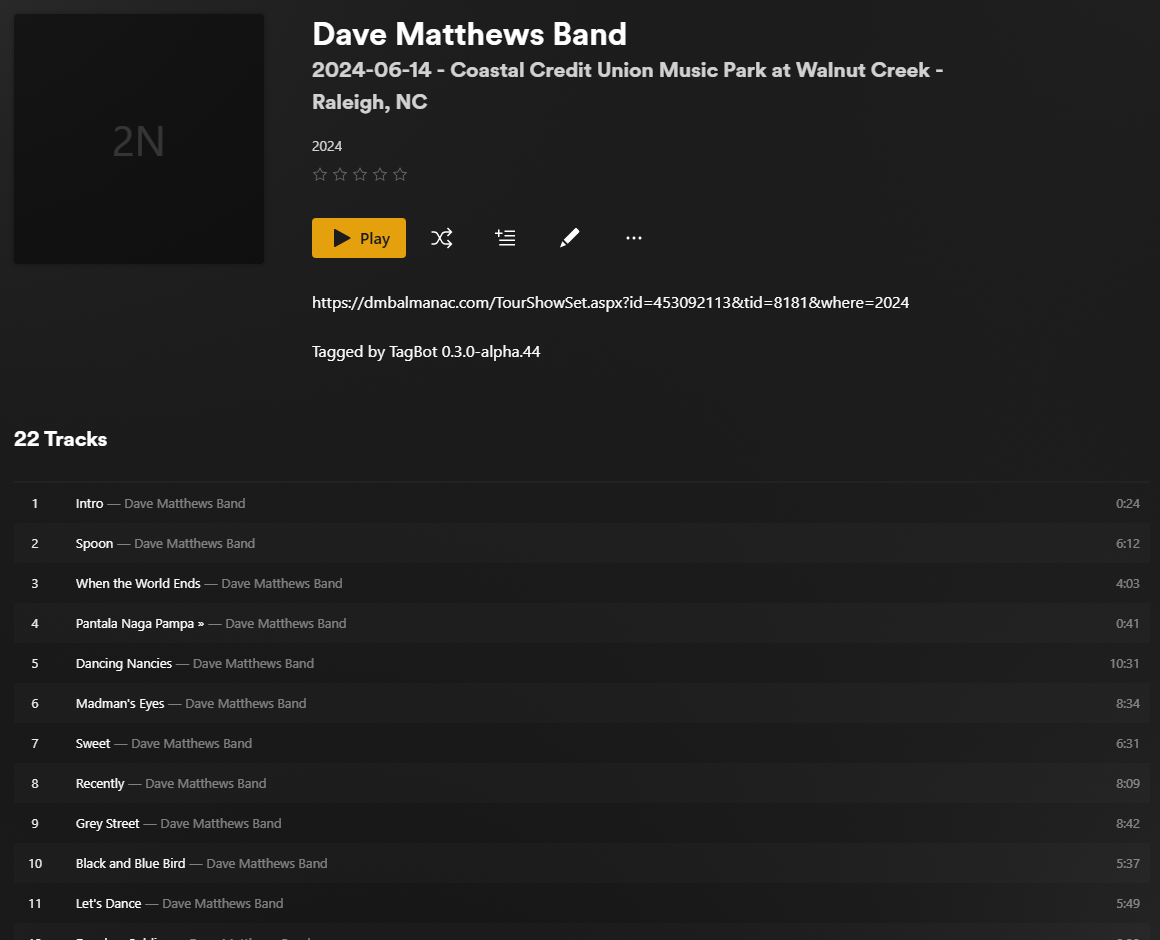
This is a friend-test release.
TagBot 0.3.0-alpha.44 is in early testing with a small group of collectors. It is fully functional but rough around some edges. If you run into something unexpected, the Gather Recent Logs button in Advanced will create a zip you can send along.
→ Download and try itORIGINS
Built on what came before.
TagBot was originally built by Syco54645 — a collector and developer whose tagger became genuinely relied upon by the live recording community. If you've ever tagged a DMB show against a local database, there's a good chance that database originated with his work.
We met years ago through a forum. He mentioned his collection — decades of Dave Matthews Band and Grateful Dead recordings — and offered to share them with a complete stranger by mailing an external hard drive across the country. That drive made the trip back and forth more than once. It's exactly the kind of thing that happens in this community.
When a computer failure took the original tooling with it, I started rebuilding the maintenance pipeline — not to build something new, but because I'd relied on his software and didn't want it to go dark. That rebuild eventually became this: instead of regenerating and distributing a static database, this version fetches setlists live, automates the write process, and handles batch sessions without manual upkeep between releases.
The original project lives at github.com/Syco54645/TagBot. He remains an active member of the community.
ROADMAP
What's coming.
- · macOS build
- · More setlist sources (etree.org and others)
No ETAs. This list reflects intent, not commitment.